



Comparison Guide 2026
HP ProBook vs OmniBook UK: Which HP Laptop Should You Buy?
Two HP laptops can look almost identical in a product grid — same screen size, same 16GB RAM, similar price — and still be built for completely different people. That’s the situation with ProBook and OmniBook. Both are solid, both are genuinely good laptops, and neither is “better” in any general sense. The question that actually matters is who’s going to be switching the thing on every morning: an IT department managing fifty of them, or one person who just wants their laptop to keep up with them.
- July 27, 2026
- 20 min read
- Techyest Team
The Real Difference Isn't Spec Sheet, It's Who's in Charge of the Laptop
ProBook Was Built for the Office
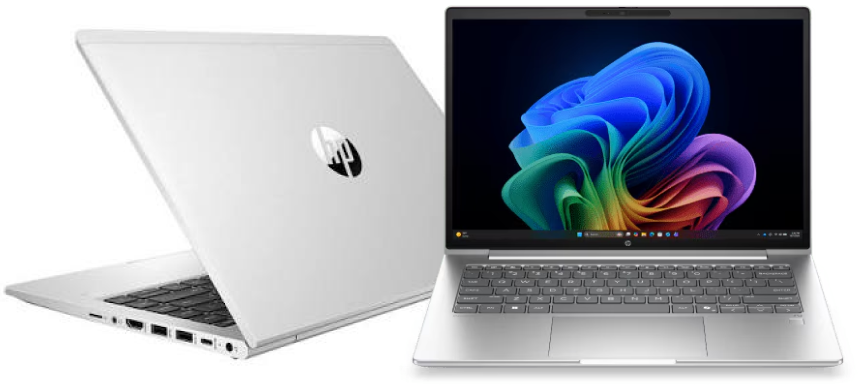
ProBook sits in HP’s business range, and it’s built around an assumption: that somebody other than the end user needs to have a say in how the laptop is set up, secured, and maintained. Models currently at Techyest run on Intel Core i5 or Core i7 processors, in 14-inch and 15-inch configurations, and — critically — ship with the business features an IT team actually needs: TPM chips for hardware-level security, fingerprint readers, and HP Wolf Security baked in.
None of that matters much to a single home user. It matters enormously to a business buying ten, thirty, or a hundred laptops that all need to be locked down the same way, patched the same way, and manageable remotely if something goes wrong. For a broader look at how ProBook stacks up against other business ranges, our Best Business Laptops for Professionals guide covers this in more depth.
OmniBook Was Built for the Person Using It
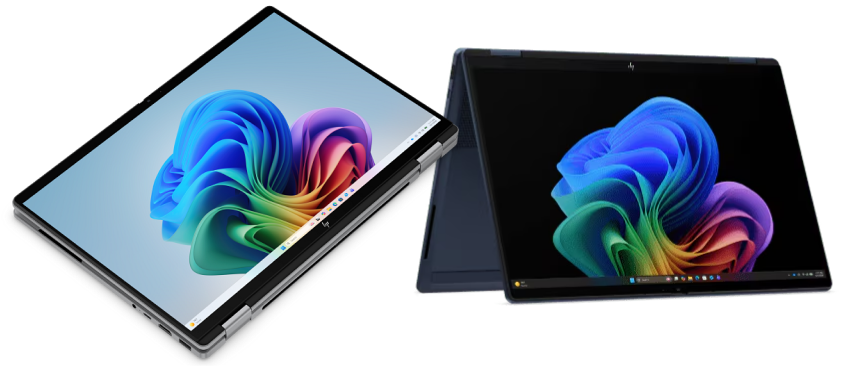
OmniBook starts from a different assumption entirely: that the person unboxing the laptop is also the person who’ll be deciding what goes on it. If that sounds like your own setup, our Best Laptops for Remote Working guide is worth a look alongside this comparison. Every OmniBook model currently at Techyest runs Windows 11 Home rather than Pro, and every one is AI-ready with a dedicated NPU — some models carry full Copilot+ PC certification, worth checking on the individual listing since that varies. Processors span AMD Ryzen AI 5, Intel Core Ultra 5, and Qualcomm Snapdragon X1, and the range includes the OmniBook X Flip — a touchscreen 2-in-1 that folds flat into tablet mode, a form factor not currently offered on ProBook.
If ProBook’s whole design philosophy is “manageable at scale,” OmniBook’s is “capable and modern for one person.” Neither is a compromise. They’re just answering different questions.
Windows 11 Pro vs Home Is the Decision That Actually Matters Most
It’s tempting to compare these two ranges on processor speed or RAM, but that’s not where the real decision lives. ProBook runs Windows 11 Pro as standard — the edition that supports domain join and remote device management, which is non-negotiable if a company’s IT team needs to administer the machine centrally. OmniBook currently runs Windows 11 Home across the range at Techyest — built for someone managing their own device, with no need (or desire) for centralised control.
If you’re buying for yourself, this cuts in OmniBook’s favour by default — Home is simpler and there’s nothing to lose by not having Pro’s management features. If you’re buying for a team, ProBook is close to a requirement rather than a preference; an IT department trying to manage Home-edition laptops at scale is fighting the software the whole way.
Where AI Features and Form Factor Fit In
This is the other place the two ranges genuinely diverge, and it’s worth being specific about it rather than gesturing vaguely at “AI laptops.” Every OmniBook here is built around a dedicated NPU, and select models carry Microsoft’s Copilot+ PC certification — on-device AI features rather than everything running through the cloud. ProBook doesn’t lean into that positioning in the same way; it’s judged on reliability and security credentials, not on-device AI capability.
Form factor is the other clear split. OmniBook’s X Flip models are 2-in-1 touchscreens that fold flat — genuinely useful if you sketch, annotate, or just prefer touch navigation sometimes. ProBook’s current range sticks to a standard clamshell. Neither is objectively better here either; it depends whether touch and tablet mode are things you’d actually use, or a feature you’d never touch.
H
- Windows edition
- Processor (current range)
- Screen sizes (current range)
- Form factor
- AI/NPU
- Security features
- Best managed by
HP ProBook
- Windows 11 Pro
- Intel Core i5 / i7
- 14-inch, 15-inch
- Standard clamshell
- Not the focus
- TPM, fingerprint reader, HP Wolf Security
- IT department / business fleet
HP OmniBook
- Windows 11 Home (current range)
- AMD Ryzen AI 5, Intel Core Ultra 5, Snapdragon X1
- 13.3-inch to 16-inch
- Clamshell + X Flip 2-in-1 touchscreen
- AI-ready; selected models Copilot+ certified
- Standard consumer security
- Individual user
Who Should Choose Which
If you’re equipping an office, a growing team, or anyone whose laptop needs to be centrally managed, ProBook is the more sensible choice — the Windows 11 Pro foundation alone makes this close to a formality rather than a genuine toss-up. Small and medium businesses in particular tend to land here: enough security and manageability to satisfy an IT policy, without paying for HP’s higher-tier EliteBook range.
If you’re buying for yourself — a student, a home user, someone hybrid-working without a managed device policy — OmniBook is the better starting point. You get modern AI-ready hardware, and if the touchscreen 2-in-1 flexibility of the X Flip appeals, that’s a genuine differentiator ProBook’s current range doesn’t offer.
ProBook and OmniBook aren’t competing for the same buyer, which is really the whole point. ProBook is HP’s answer to “how do I equip a team I need to manage.” OmniBook is HP’s answer to “how do I get a modern, AI-ready laptop for myself.” Once you know which question you’re actually asking, the choice mostly makes itself.
If you’re buying for a business, our Business Laptops category lets you compare ProBook against Lenovo ThinkPad and other professional ranges — most of them, like ProBook, built around 16GB RAM configurations and Intel Core i5 or Core Ultra 5 processors as the sensible middle ground. Our Business Solutions team can help if you need multiple units with consistent specs. If you’d rather browse HP’s full lineup — ProBook and OmniBook side by side — that’s all on our HP Laptops page. And if you’re still weighing up laptops beyond HP entirely, our Laptop Buying Guide UK is the right starting point.
FAQs
Is HP ProBook or OmniBook better for business use?
Can I use an OmniBook for work if I'm self-employed or freelance?
Does OmniBook come with Windows 11 Pro?
What's the difference between the OmniBook X Flip and a standard ProBook?
Are all HP OmniBook laptops Copilot+ PCs?
Does ProBook come in an Intel Core Ultra 5 configuration?
Currently, ProBook at Techyest is available with Intel Core i5 or Core i7. If you specifically want an Intel Core Ultra 5 chip, our Intel Core Ultra 5 category shows which models across HP’s range, including OmniBook, currently offer it.
Do ProBook and OmniBook laptops come with a UK warranty?

TechYest Editorial Team
The Techyest Team is a group of UK-based laptop specialists providing practical, honest buying advice for consumers and businesses across the United Kingdom. Our content is researched and written by in-house specialists with hands-on experience across HP, Dell, Lenovo, and ASUS product ranges. Every recommendation is based on direct product knowledge and a clear understanding of what UK buyers need at different budgets. All buying guides published under the Techyest Team are reviewed for accuracy against current UK stock availability, pricing, and manufacturer specifications before publication.
Follow Us On:


In This Guide
Recommended Picks:
SKU: B3AC8AT#ABU
- Intel Core 5
- 16GB
- 256GB SSD

£793.94 Excl. VAT
- AMD Ryzen AI
- 16GB
- 1TB SSD
£742.96 Excl. VAT